The Missing Link Between Clicks and Revenue.
Fusion Relays combine your call tracking data (which ad was clicked) with your CRM or field service data (how much revenue the job generated) into a single, revenue-attributed conversion. Google Ads finally knows a click was worth $4,500 — not just that someone called.
Available on: Pro and Agency tiers
Your Ad Platform Sees Clicks. Your CRM Sees Revenue. Neither Sees Both.
Two Sources. One Conversion. Full Revenue Attribution.
TUOCA's Fusion engine matches records across your two data sources and creates a single conversion that tells the whole story.
Attribution Source Captures the Click
CallRail (or CTM, or your webhook) captures the phone call and records: GCLID, caller phone number, call duration, tags.
Revenue Source Captures the Value
ServiceTitan (or Jobber, or your CRM) completes the job and records: customer phone number, $4,500 revenue, job type, completion date.
TUOCA Fuses on Phone Number
TUOCA matches the two records using the shared phone number. The result: one conversion record containing the GCLID (which ad was clicked) and $4,500 (what the click was worth).
Upload to Google Ads
The fused job is the click ID, the hashed phone or email, and the $4,500. That dollar amount is an example of an invoice. Google requires the Data Manager API for a new upload of that job. A script that still uses the old upload call is rejected if its developer token was not already uploading. Once the job is in the account, Google can see that this click generated $4,500, and Smart Bidding can bid for more clicks like it.
What Changes When Google Sees Revenue
Before Fusion
Standard call conversion uploads
- Google sees: "a call happened"
- Every qualified call counts as 1 conversion
- A $200 drain clearing = same signal as $12,000 HVAC install
- Smart Bidding optimizes for call volume, not revenue
- tROAS is impossible — Google has no revenue data
After Fusion
Revenue-attributed conversions via Fusion Relay
- Google sees: "a call generated $4,500"
- Every conversion carries its actual revenue value
- $200 drain clearing ≠ $12,000 HVAC install
- Smart Bidding optimizes for revenue per click
- tROAS bidding finally works with real data
How a Plumbing Company Uses Fusion Relays
The setup: A plumbing company runs Google Ads. Leads come in via CallRail (phone calls). Jobs are completed in ServiceTitan (field service software). They want Google to know which ad clicks lead to the highest-revenue jobs.
The Fusion Relay:
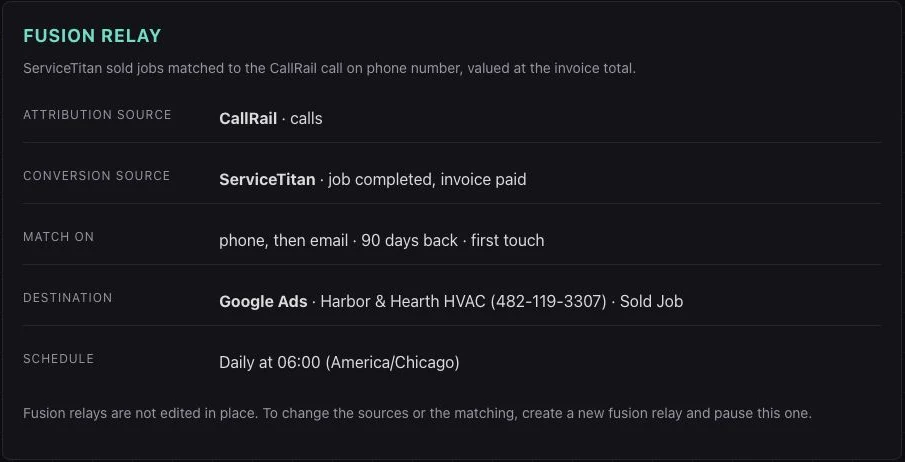
- Attribution Source: CallRail — captures GCLID + caller phone number
- Revenue Source: ServiceTitan — captures completed job revenue + customer phone
- Match Key: Phone number (E.164 normalized)
- Destination: Google Ads — uploads GCLID + revenue as offline conversion
- Schedule: Daily at 6am (after 24hr processing buffer)
The result: Google Ads now sees that clicks on "Emergency Plumber Austin" generate $800 average revenue, while "Drain Cleaning Near Me" generates $180. Smart Bidding shifts budget to the higher-value keyword clusters automatically.
Supported Fusion Combinations
Choose a supported attribution source and conversion source, then a destination suited to the identifiers in your matched records.
Attribution Sources
Where the click ID comes from
- CallRail
- CallTrackingMetrics
Revenue Sources
Where the money data lives
- ServiceTitan
- Jobber
Destinations
Where fused conversions go
- Google Ads
- Meta (Facebook CAPI)
- Microsoft Ads
- TikTok Events API
See a Fusion Workflow in the App
This sample workflow matches CallRail leads to ServiceTitan job events, then sends the result to Google Ads. The view shows both sources, matching rules, destination, and schedule. All data shown is illustrative.
Fusion Relay Questions
A regular relay pulls data from one source and uploads it to one destination. A Fusion Relay pulls data from two sources — an attribution source (call tracking) and a revenue source (CRM/FSM) — matches them on a shared field like phone number, and creates a single conversion that contains both the click ID (GCLID) and the revenue value. That lets you report the value of the matched job alongside its original ad attribution.
The Fusion setup offers CallRail and CallTrackingMetrics as attribution sources, and ServiceTitan and Jobber as conversion sources. For example, match a CallRail lead to a ServiceTitan job. Both records need a usable shared identifier, and the earlier lead must contain the attribution data you want to send.
TUOCA matches records using a shared identifier — typically the caller's phone number. When CallRail logs a call with a GCLID and phone number, and ServiceTitan later logs a completed job with the same phone number and a revenue value, TUOCA fuses them into a single conversion: GCLID + $4,500.
By default, conversions without a matching attribution record are excluded from the fused upload. The Include Unmatched setting can include conversion-source records using available phone or email identifiers for enhanced conversions. It does not recover a missing click ID, and the destination still needs to accept the supplied identifiers.
Fusion Relays are available on the Pro and Agency tiers. Solo includes standard automated relays but not Fusion Relays. Free includes manual uploads only.