Visual Logic Rules. No Code. No Spreadsheets.
Decide exactly which records become conversions. The Filter Builder uses drag-and-drop rules with nested AND/OR logic — so you can filter calls by duration, tags, status, revenue, and any other field. No formulas. No developer.
Available on: Solo, Pro, and Agency tiers
Not Every Call Is a Conversion
Uploading every record to Google Ads pollutes your conversion data and destroys Smart Bidding performance.
Junk Conversions
A 12-second hangup call isn't a lead. A "wrong number" tag isn't a booking. But without filtering, Google Ads counts them all the same.
Polluted Bidding
Smart Bidding learns from your conversion data. Feed it garbage signals and it optimizes for garbage — bidding the same for a $200 drain clearing and a tire-kicker hang-up.
Spreadsheet Filtering
Manually filtering CSVs in Excel before uploading? That's error-prone, time-consuming, and impossible to maintain consistently across 50+ clients.
Drag. Drop. Filter. Done.
Build arbitrarily complex filter logic without writing a single line of code.
Qualified Calls Only
ANDUpload only calls that actually matter to campaign optimization.
High-Value Leads
ANDFilter for leads above a revenue threshold to optimize for ROAS.
Multi-Condition Logic
A(AND) OR BComplex rules with nested groups for nuanced lead qualification.
Six Operators. Infinite Combinations.
Equals
tag equals "Booked Job"
Not Equals
status ≠ "Cancelled"
Contains
notes contains "HVAC"
Greater Than
call_duration > 60
Less Than
sale_amount < 100
Is Empty
gclid is_empty (skip non-Google traffic)
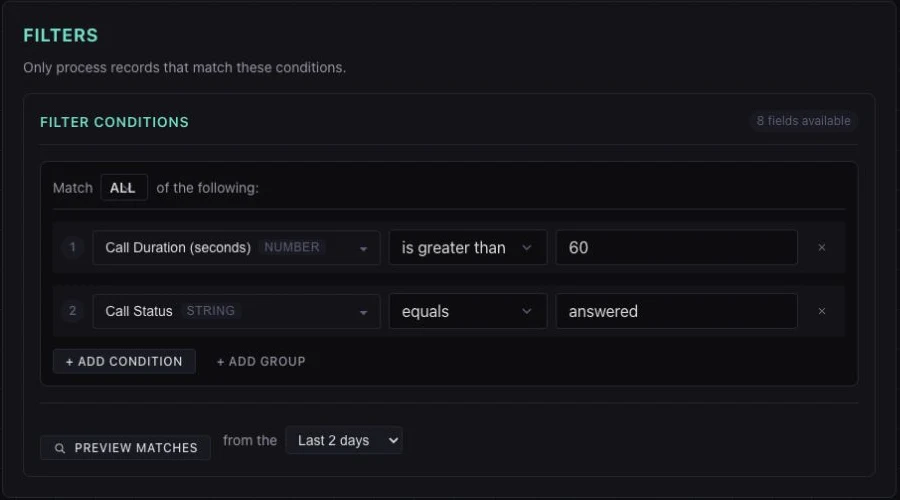
The Filter Builder Interface
This sample keeps answered calls longer than 60 seconds. Combine conditions and preview matches before activating your workflow.
Where Filters Fit in the Relay Pipeline
Filters apply early — after fetching, before deduplication — so you never waste processing on unwanted records.
Filter Builder Questions
Absolutely not. The Filter Builder is a visual, drag-and-drop interface. You select a field, pick an operator, and type a value. To create complex logic, you nest groups with AND/OR — all via the UI. There are no formulas, no scripting, and no query languages to learn.
Six operators cover virtually every filtering scenario: equals, not_equals, contains, greater_than, less_than, and is_empty. These can be combined with nested AND/OR groups for arbitrarily complex logic — like (call_duration > 60 AND tag = "Booked") OR (call_duration > 120).
Filters run after fetching and before deduplication. This means TUOCA first pulls all records from your source, then applies your filter rules to keep only qualifying records, then deduplicates the remaining set. This order ensures you never waste dedup storage on records you don't want.
Yes — every relay has a dry run mode. When you run a dry run, TUOCA executes the full pipeline including your filters but stops before uploading. You can see exactly which records passed your filters, which were excluded, and why. Refine your rules risk-free.
The Filter Builder is available on Solo, Pro, and Agency tiers — anywhere automated relays are supported. The Free tier includes manual CSV uploads only (no automated pipelines, no filters).