One Dashboard. Every Client. Complete Visibility.
Stop logging into individual accounts to check status. The Agency Dashboard gives you cross-client relay health, upload metrics, and alerts — all from a single view. Spot issues across your entire book of business at a glance.
Available on: Agency tier
Agency Operations Don't Scale Without Tooling
Managing offline conversions for multiple clients means juggling dozens of disconnected workflows. The bigger you grow, the harder it gets.
Account Hopping
Checking relay health means logging into each client's view individually. At 50 clients, your morning check takes hours — not minutes.
Invisible Failures
A relay fails for Client 23 on Tuesday. You don't notice until Friday when the client calls asking why their Google Ads data is stale. No centralized alerting means problems hide.
Slow Onboarding
Adding a new client means manually creating the account, setting up connections, configuring relays, and assigning team access. One at a time. For every new client.
Built for Agencies Managing at Scale
Five capabilities that turn multi-client chaos into a 10-minute morning check.
Cross-Client Overview
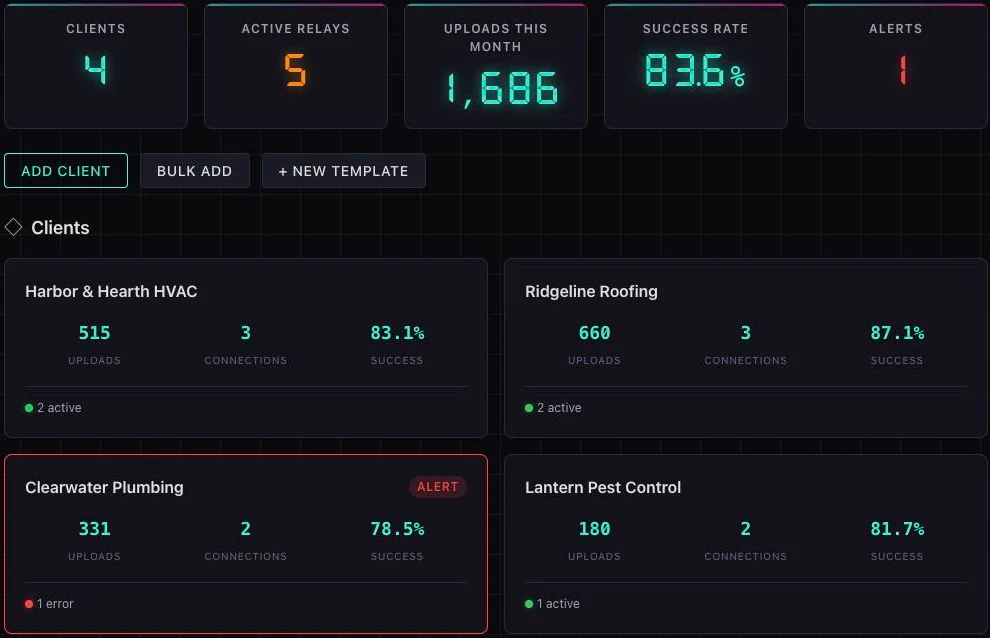
See relay health, upload counts, success rates, and alerts across every client from a single dashboard view. Red flags surface instantly — no more account-hopping to find problems. Filter by status, sort by last activity, and drill into any client with one click.
Bulk Client Onboarding
Upload a CSV to create dozens or hundreds of client accounts in a single operation. Each row becomes an isolated data silo, ready for connection setup. Stop creating accounts one by one — onboard an entire roster in minutes, not days.
Team Templates
Create pre-configured blueprints for connections and relays. When a new client comes onboard, apply a template to auto-configure their default data source, destination, filter rules, and schedule. What used to take 30 minutes of setup now takes 2.
One-Click Client Switching
Navigate between client data silos instantly. The sidebar shows all clients with status indicators — click to switch context. Every view (relays, connections, logs, uploads) updates immediately. No logout/login dance, no URL changes.
Team Management & Permissions
Assign roles to your team: Owner, Admin, Member, or Viewer. Delegate relay monitoring to account coordinators, give campaign managers read-only access, and keep billing locked to owners. Email invitations with 7-day expiry links.
The Agency Dashboard
Cross-client visibility. Relay health. Upload counts. Client status. All in one view.
How a Growing Agency Scales with the Dashboard
The agency: A performance marketing firm managing Google Ads and Meta campaigns for 85 home services clients — HVAC, plumbing, roofing, and electrical. Each client uses a mix of CallTrackingMetrics and CallRail for call tracking. The team has 4 account coordinators and 2 campaign managers.
Before the Agency Dashboard: The director spent the first hour of every day checking relay statuses — opening each client individually, looking for failures, and cross-referencing upload counts. When a relay failed overnight, it often went unnoticed for days. Onboarding a new client meant 45 minutes of manual setup per account.
With the Agency Dashboard:
- Morning check: 10 minutes — the cross-client view shows all 85 clients with green/yellow/red health indicators. Two clients flagged with failed relays are immediately visible.
- Bulk onboarding — a new HVAC franchise group signs on with 12 locations. All 12 are created from a single CSV upload in under a minute.
- Team templates — each new location gets the "HVAC Standard" template applied: CTM → Google Ads, calls > 60s, daily at 6am. Setup per client: 2 minutes.
- Team permissions — account coordinators have Member access (monitor + trigger relays). Campaign managers have Viewer access (read-only dashboards for client reporting). The director and COO have Admin access.
The result: What used to take 9+ hours of onboarding (12 clients × 45 min) now takes 30 minutes. Daily monitoring dropped from 60 minutes to 10. The agency added 30 clients in Q1 without adding headcount.
Agency Dashboard Questions
The Agency tier supports unlimited clients. Whether you manage 5 or 500 client accounts, the dashboard scales with you. Each client exists in a completely isolated data silo — there is zero performance degradation as you add more clients.
Prepare a CSV with your client details (name, industry, contact info) and upload it to TUOCA. Each row creates a new isolated client account with its own data silo, ready for connection and relay setup. You can onboard 100 clients in a single operation instead of creating them one at a time.
Team templates are pre-configured blueprints for connections and relays. When you onboard a new client, you can apply a template that automatically sets up default connections (e.g., CallTrackingMetrics → Google Ads) and relay configurations (e.g., calls > 60s, daily schedule). This turns a 30-minute setup into a 2-minute operation.
Yes — TUOCA uses role-based access control with four levels: Owner (full control including billing), Admin (manage connections, relays, and clients), Member (view dashboards, trigger relays), and Viewer (read-only access). Invite team members via email with secure 7-day expiry links.
The Agency Dashboard, bulk onboarding, team templates, and unlimited clients/relays are exclusive to the Agency tier. If you manage fewer than 3 clients, the Pro tier may be sufficient — it supports up to 3 clients with Fusion Relays and webhooks, but without the cross-client dashboard.