Set It and Forget It: Automated Conversion Pipelines
Build a relay once and it runs on your schedule — hourly, daily, or weekly. TUOCA handles the entire pipeline: fetching your data, filtering records, deduplicating, transforming fields, uploading to your ad platform, and logging every result.
Available on: Solo, Pro, and Agency tiers
Manual Uploads Don't Scale
At 20 clients across 4 ad platforms, manual CSV downloads and uploads consume 40+ hours per month. And that's if nothing goes wrong.
Download
Log into each call tracking platform. Export calls for the right date range. Save as CSV. For every client. Every week.
Reformat
Each ad platform expects a different format. Rename columns. Fix date formats. Hash PII. Remove duplicates. Pray you didn't miss a row.
Upload
Log into Google Ads. Navigate to the right account. Upload the CSV. Check for errors. Repeat for Meta, Microsoft, TikTok. For every client.
For an agency with 20 clients × 4 platforms × weekly uploads = 320 manual operations per month.
6 Steps. Fully Automated. Zero Manual Work.
Every relay runs the same proven pipeline. Configure it once — TUOCA handles the rest.
Fetch
Pull data from your connected source via its API. Calls, jobs, invoices, webhook events — whatever your source provides.
Automatic pagination, rate limit handling, and OAuth token refresh. You never touch an API directly.
Filter
Apply your custom filter rules. Only keep records that match your criteria.
Example: call_duration > 60 AND tag = "Booked Job". Nested AND/OR groups for complex logic. Built with the visual Filter Builder.
Deduplicate
SHA-256 hash-based deduplication. Records already uploaded in previous runs are automatically skipped.
No double-counting, even if your date ranges overlap. Dedup hashes are stored per-relay and persist across runs.
Transform
Map source fields to the destination's required format. Normalize dates, hash PII, format phone numbers.
Automatic E.164 phone formatting, SHA-256 PII hashing for Enhanced Conversions, and timezone-aware date conversion.
Upload
Send the transformed records to your ad platform via its official API. Batched and rate-limited per platform requirements.
Google requires the Data Manager API for a new offline or enhanced-conversions upload. One events request holds 2,000 events. Meta Conversions API on Graph API v26.0 holds 1,000. Microsoft Advertising API v13 holds 1,000. TikTok Events API 2.0 holds 1,000.
Log
Every record's outcome is logged: success, failure (with error message), or skipped (dedup). Full transparency.
Execution duration, record counts (fetched, filtered, deduped, uploaded), and per-record status. Exportable for auditing.
Built for Reliability at Scale
Flexible Scheduling
Run hourly, daily, or weekly. Timezone support ensures runs align with your business hours. Change schedule anytime without recreating the relay.
Automatic Retry Queue
Failed uploads (rate limits, transient API errors) are automatically retried with exponential backoff. No manual intervention needed.
Dry Run Mode
Test your entire pipeline without uploading. See exactly what would be sent to the ad platform. Validate filters, field mappings, and data quality.
Per-Record Tracking
Every record in every run is tracked: fetched → filtered → deduped → uploaded (success/fail). Full audit trail for client reporting.
PII Hashing
Normalize and SHA-256 hash supported customer identifiers for enhanced conversions as part of your upload workflow.
Platform-Aware Batching
A Data Manager events request holds 2,000 events. A script that sends those 2,000 jobs to the old Google Ads upload call is rejected when the developer token was not already uploading. A Meta request holds 1,000 events, and one bad event rejects the batch.
The Relay Editor
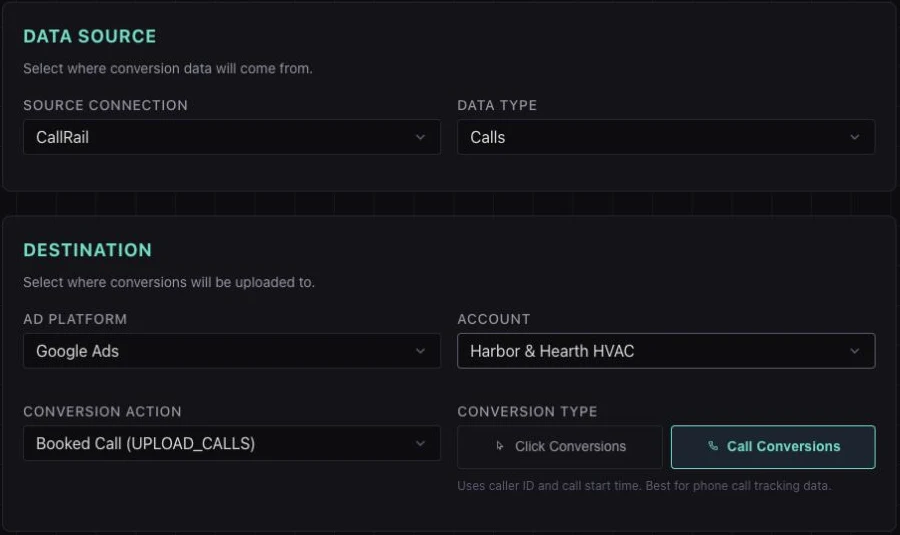
Choose the source and the conversion action that should receive its records. This crop shows a CallRail-to-Google Ads configuration; filters and scheduling follow in the editor.
How an HVAC Agency Uses Automated Relays
The agency: Manages Google Ads for 35 HVAC companies. Each client uses CallTrackingMetrics for call tracking. The agency needs to upload qualified calls as offline conversions to each client's Google Ads account — daily.
Before TUOCA: An account coordinator spent 2-3 hours every morning downloading CSVs from CTM, reformatting them for Google Ads import, and uploading them one account at a time. At 35 clients, that was ~60 hours/month of repetitive work.
With TUOCA: 35 relays, one per client. Each relay:
- Fetches yesterday's calls from the client's CTM sub-account
- Filters for calls > 60 seconds tagged "Qualified Lead"
- Deduplicates against previously uploaded calls
- Transforms to Google Ads format (GCLID, conversion time, value)
- Uploads to the client's Google Ads account via API
- Logs every record's outcome for the client report
The result: 60 hours/month → 0. The relays run at 6am daily. The coordinator reviews the dashboard for 10 minutes, checks for any flagged errors, and moves on.
Automated Relay Questions
You can schedule relays to run hourly, daily, or weekly. All schedules support timezone configuration so your runs align with your business hours. You can also trigger relays manually at any time from the dashboard.
Failed records are automatically placed in a retry queue. TUOCA retries with exponential backoff, respecting the platform's rate limits. The activity log shows exactly which records failed, why, and whether they were successfully retried. Common transient errors (rate limits, API timeouts) are handled automatically.
TUOCA uses SHA-256 hash-based deduplication. Each record is hashed based on its key fields (click ID, conversion time, conversion action). If a record with the same hash was already uploaded in a previous run, it's skipped automatically. This prevents double-counting even if your source data overlaps across runs.
Yes — every relay has a dry run mode. In dry run, TUOCA executes the full pipeline (fetch, filter, deduplicate, transform) but stops before the upload step. You can see exactly what would be uploaded, review the transformed data, and verify your filters are correct — all without touching your ad platform.
Automated relays are available on Solo (3 relays), Pro (10 relays), and Agency (unlimited relays). The Free tier includes manual CSV/Excel uploads only.