Connect Your Leads, Revenue, and Ad Platforms.
Find a route from the tools you already use to your ad platform. Check the supported event, required fields, and account permissions before building your workflow.
Where Your Data Comes From
Call tracking platforms, CRMs, field service tools, and custom webhooks. TUOCA fetches your records automatically.
CallTrackingMetrics
Multi-account support163+ sub-accounts supported. 24-field call schema including GCLID, call duration, tag, and custom fields. API key authentication with automatic pagination.
CallRail
Wizard setup3-step connection wizard. Full call schema with source tracking, tag filtering, and conversion-ready data. Supports both v2 and v3 APIs.
ServiceTitan
Fusion Relay readyConnect with your tenant ID, app key, client ID, and client secret. TUOCA uses these credentials to access job and invoice data for supported conversion workflows.
Jobber
GraphQL APIOAuth 2.0 via GraphQL API. 18+ fields including quotes, jobs, invoices, and client details. Perfect for field service businesses tracking job-to-conversion pipelines.
Webhooks
Real-time triggersSend JSON events to a client webhook endpoint, map the fields, and trigger a configured relay. Useful when your source can send events as work is completed.
Where Conversions Go
Upload to every major ad platform. No per-platform fees — all destinations are included in every plan.
Google Ads
MCC supportUpload click conversions, call conversions, and enhanced conversions, including across an MCC. Google requires the Data Manager API for a new upload of those jobs. After June 15, 2026, the old Google Ads upload call rejects developer tokens that were not already uploading. Uploading a CSV yourself under Goals → Conversions → Uploads does not use that call.
Microsoft Ads
Goal matchingOAuth authentication with automatic token refresh. Upload offline conversions with MSCLKID matching through Campaign Management API v13. Microsoft is retiring the SOAP API on January 31, 2027.
Meta (Facebook)
Enhanced MatchingConversions API (CAPI) event uploads. Enhanced Matching with hashed PII. Custom event name mapping with standard and custom event types. Pixel and dataset selection.
TikTok
Event type mappingEvents API 2.0 integration. Offline events use an Offline Event Set ID. Supports standard events with hashed user data and a TTCLID when you have one.
Combine Any Source with Any CRM
Fusion Relays merge click attribution with revenue data. Here's what's possible.
Match phone calls to completed jobs. Upload revenue-attributed conversions.
Combine CTM call data with Jobber job revenue for Smart Bidding optimization.
Revenue-attributed Conversions API events for Meta campaign optimization.
Real-time webhook leads matched with ServiceTitan revenue.
Check Your Specific Workflow
Some sources have narrower workflows. Tell us what you need to send so we can confirm the right approach.
HubSpot
Ask about contact-based workflows. Deal-stage revenue mapping is not currently offered by the native connector.
Housecall Pro
Discuss your job event and required fields with us before choosing a workflow.
Google Sheets
Ask about spreadsheet imports. Scheduled Google Sheets relays are not currently offered.
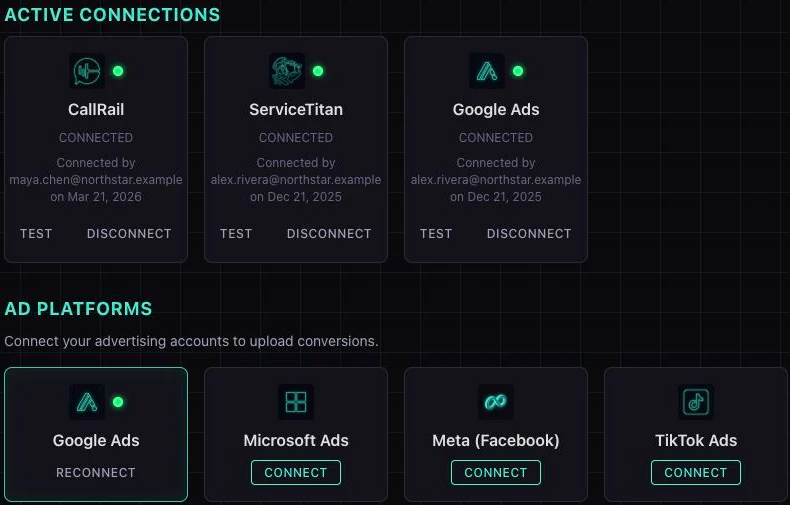
See Your Connections in One Place.
Review connected sources and available ad platforms. The sample below connects CallRail and ServiceTitan to Google Ads; credentials and permissions vary by integration.
Integration Questions
Setup depends on the source. CallTrackingMetrics and CallRail use API credentials. ServiceTitan requires a tenant ID, app key, client ID, and client secret. Jobber and supported ad-platform connections use an authorization flow. You need permission to access the relevant account and conversion data.
Yes. You can connect multiple Google Ads accounts (including via MCC), multiple CTM accounts, etc. Each connection counts toward your plan's connection limit. The Agency tier includes unlimited connections.
TUOCA automatically refreshes OAuth tokens before they expire. If a refresh fails (e.g., the user revoked access), the connection status changes to "Error" with a clear message explaining what happened. You'll see an alert in the dashboard and can re-authorize with one click.
A Fusion Relay combines data from two different sources — typically a call tracking platform (for click attribution) and a CRM/job management platform (for revenue data). For example: CallRail + ServiceTitan → Google Ads creates revenue-attributed conversions. See the Fusion Relays page for details.
Tell us the source, the event you want to send, and the ad platform. We can help you check whether a native connection, a prepared file upload, or a webhook fits. A connection alone does not mean every event or revenue field is supported.